 MedAssistant
Inbox
All your patients' reports in one place — questionnaires, Scribe notes, agent reports and documents.
The inbox brings together everything about your patients: completed questionnaires, Scribe notes, pre-visit agent reports and signed documents. It updates on its own; no need to refresh the page.
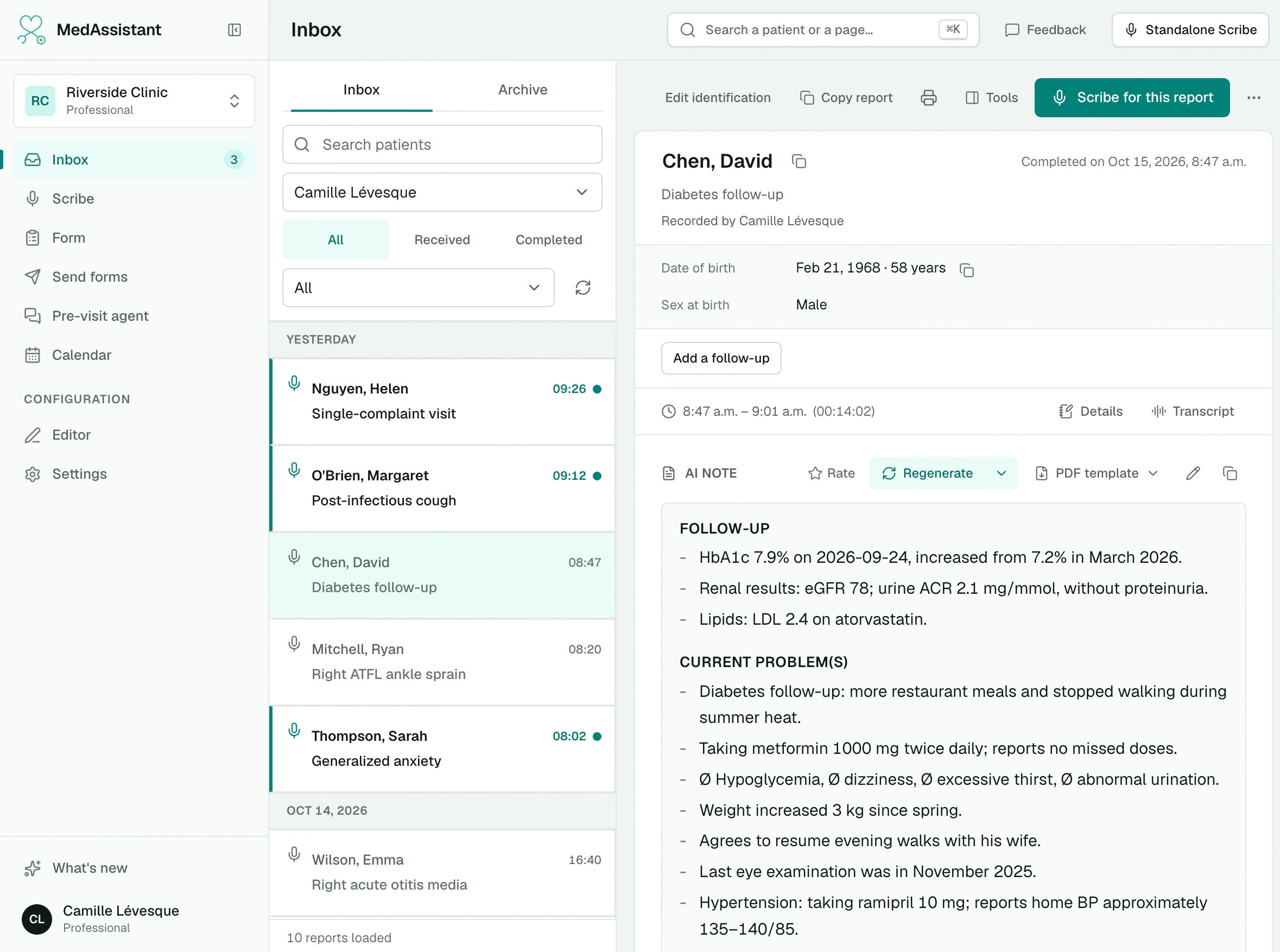
The list
On the left, the list of reports, grouped by day (Today, Yesterday, then the date). On the right, the selected report. On a phone, the report replaces the list; Back to list returns to it.
Each line shows:
- the patient, as "Last name, First name", or Anonymous;
- the time, in bold with a green dot until the report is read;
- the report type and its label: questionnaire name, Scribe category or the agent's consultation reason;
- +N reasons when the patient gave several reasons for the visit;
- who filled it in or recorded it, when it wasn't the patient.
| Type | What it is |
|---|---|
| Forms | A questionnaire filled in by the patient or at the clinic. See Read the report. |
| Recordings | A Scribe note and its follow-ups. See Review the note. |
| Agent | The report from a conversation with the pre-visit agent. See Pre-visit agent. |
| Files | A PDF document the patient read or attested. |
An agent report whose conversation isn't finished shows Report in preparation.
Find a report
- Search patients: type at least two letters of the first or last name. With two words, first and last names are searched in both orders.
- Professional: by default, you see your own reports. Choose a colleague, or All professionals.
- All, Received, Completed: when a professional is selected, Received shows the reports patients addressed to them, Completed the ones they filled in themselves, and All both, plus reports with no recipient.
- Type: All, Unread, Forms, Files, Recordings or Agent.
- Refresh reloads the list.
Reports load in batches; Continue searching loads the rest.
Quick search
Anywhere in the app, ⌘ K (or Ctrl K) finds a patient and opens their report directly.
Inbox and Archive tabs
Archive removes a report from the inbox without deleting it: it stays in the Archive tab. Unarchive brings it back.
Actions on a report
Right-click a line, or open the report's ⋯ menu:
- Mark as read or Mark as unread (opening a report marks it as read);
- Edit identification of the patient;
- Edit consultation reason, in French and English, for a Scribe note or an agent report;
- Archive or Unarchive;
- Download PDF (from the open report);
- Copy report ID, useful for a support request;
- Delete, after confirmation. Deletion is permanent.
For a visit with follow-ups, these actions apply to the whole visit.
In a report's header
- The patient's name opens their identification; each detail has its own copy button.
- Copy report copies the content, with your end-of-note text.
- Print.
- Scribe for this report records the visit linked to this report. See Scribe with a questionnaire or an agent.
- Tools opens the side panel: Scribe and recommendations linked to the questionnaire.
How long reports are kept
Reports are deleted automatically based on the periods the manager sets in Organization › Data retention. By default, a Scribe note is kept for 48 hours and a questionnaire or agent report for 15 days. Copy what you need to keep into your EMR. See Data retention.
Get notified by email
To receive an email every time a questionnaire is completed, set Email notifications in Settings › Preferences. See Account settings.